How to Pay with Crypto: Checkout in Under 2 Minutes
We settle in crypto only. No cards, no billing data, no account required. Your key is delivered automatically the moment your payment confirms.
At checkout you’ll see two options. This page walks through both, screen by screen, so you know exactly what’s coming.
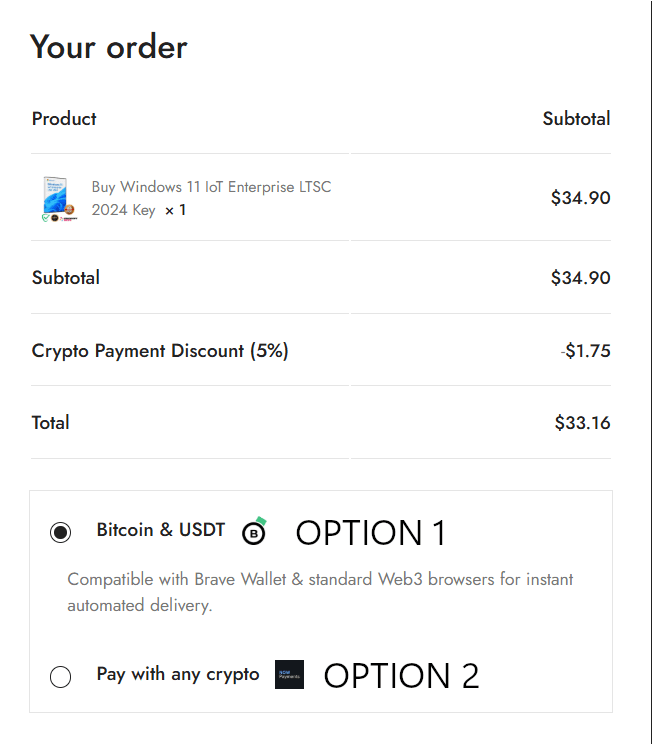
Quick answer:
| You hold… | Choose | Flow |
|---|---|---|
| Bitcoin | Option 1 | Address + QR |
| USDT and you use a Web3 wallet (Brave, MetaMask, Trust) | Option 1 | Connect wallet, one click |
| USDT on TRON or BSC (cheapest fees) | Option 2 | Address + QR |
| Anything else: LTC, XRP, SOL, BNB, TRX, TON, USDC | Option 2 | Address + QR |
🟠 Option 1: Bitcoin & USDT
Two different experiences depending on which coin you pick.
1A Paying with Bitcoin
Straightforward address-and-QR payment. No wallet connection, no account.
Step 1. Select Bitcoin & USDT at checkout and place your order.
Step 2. You’ll land on the payment screen showing your order number, the USD total, a QR code, the Bitcoin address, and the exact BTC amount to send.
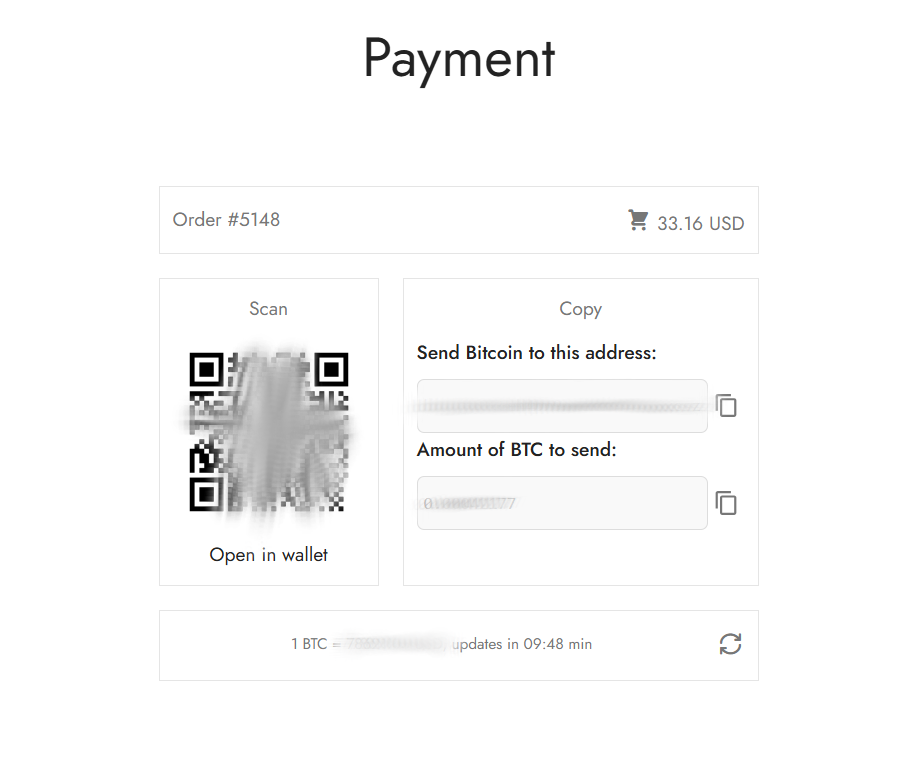
Step 3. Either scan the QR with your wallet app, tap Open in wallet to hand off to a wallet on the same device, or copy the address and amount manually.
Step 4. Send the exact amount shown. The screen displays the locked BTC/USD rate and a countdown: the rate refreshes about every 10 minutes, so send promptly or refresh for an updated quote.
Step 5. Bitcoin typically confirms in 10–30 minutes. Your key is emailed automatically on confirmation.
1B Paying with USDT (Web3 wallet)
This path is a proper wallet connection: no copying addresses, no manual amounts.
Step 1. Select Bitcoin & USDT, choose USDT, and place your order.
Step 2. You’ll see a two-stage progress bar — Connect Wallet → Pay — with the live USDT/USD rate.
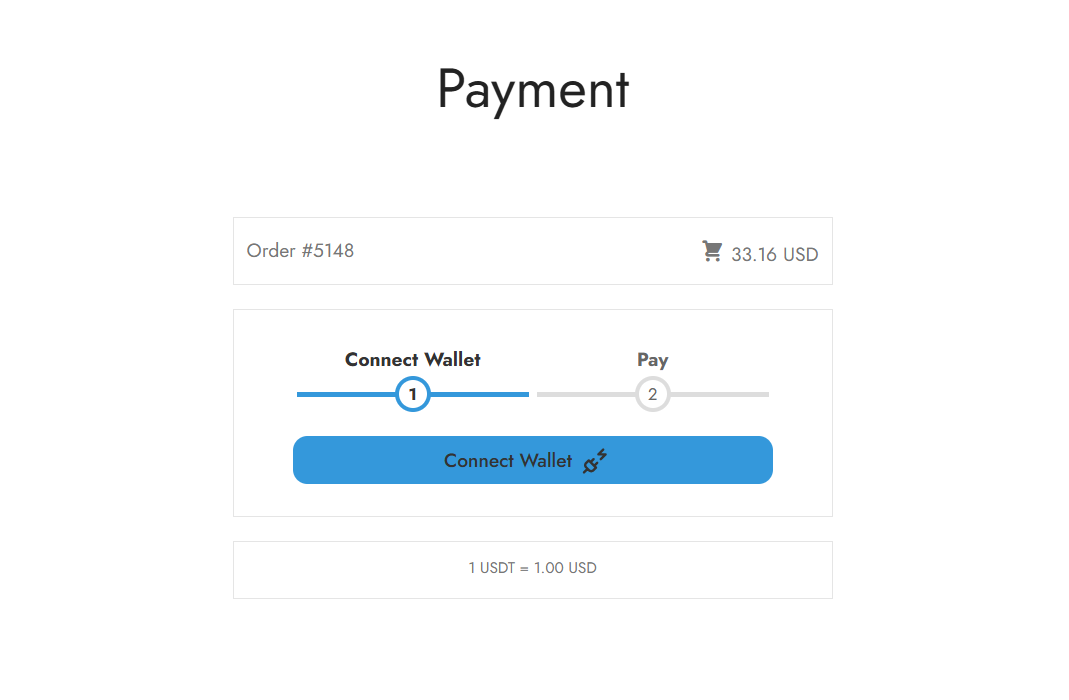
Step 3. Click Connect Wallet. A wallet picker opens with WalletConnect (scan by QR from a phone), Brave Wallet, MetaMask, Trust Wallet, Base, Binance Wallet and Coinbase. Wallets already installed in your browser are marked.
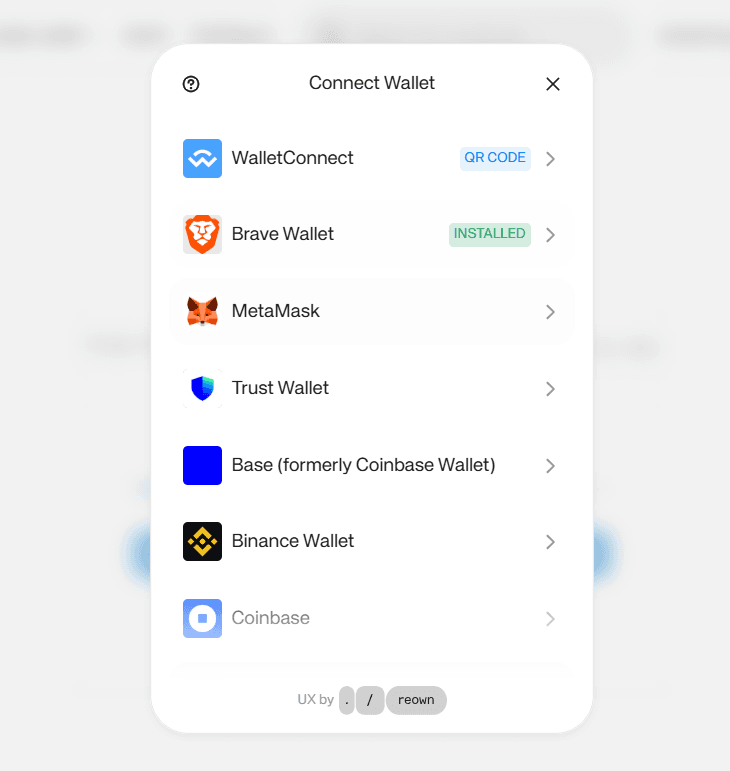
Step 4. Approve the connection, then approve the payment in your wallet. The amount is pre-filled: no chance of sending the wrong figure.
Step 5. Confirms in a minute or two, key delivered automatically.
⚠️ USDT in Option 1 settles on the Ethereum network (ERC-20). Ethereum gas is charged per transaction regardless of size.
If you hold USDT on TRON or BSC, use Option 2 instead: the same USDT, under $1 in network fees.
🔵 Option 2: Pay With Any Crypto
300+ assets. No wallet connection needed: you pick your asset and get an address.
Step 1. Select Pay with any crypto at checkout and place your order.
Step 2. Choose your asset. Search by name or browse the All / Popular / Stablecoins / Bridged version tabs. Multi-chain assets show their network as a tag: BNB is labelled BSC, and USDT appears separately for TRON, BSC, Solana and Ethereum.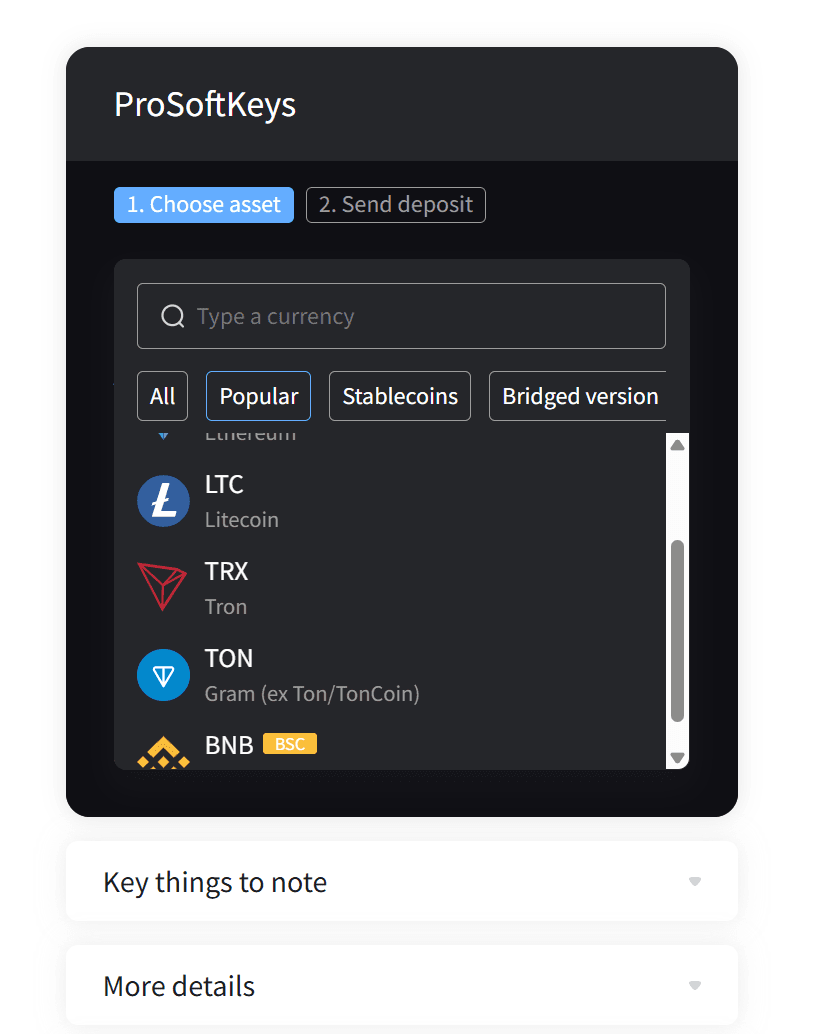
Step 3. Send your deposit. You get a QR code, the exact amount in your chosen coin, the deposit address, and a clear statement of which blockchain to use — for example “Send LTC on the LTC blockchain.”
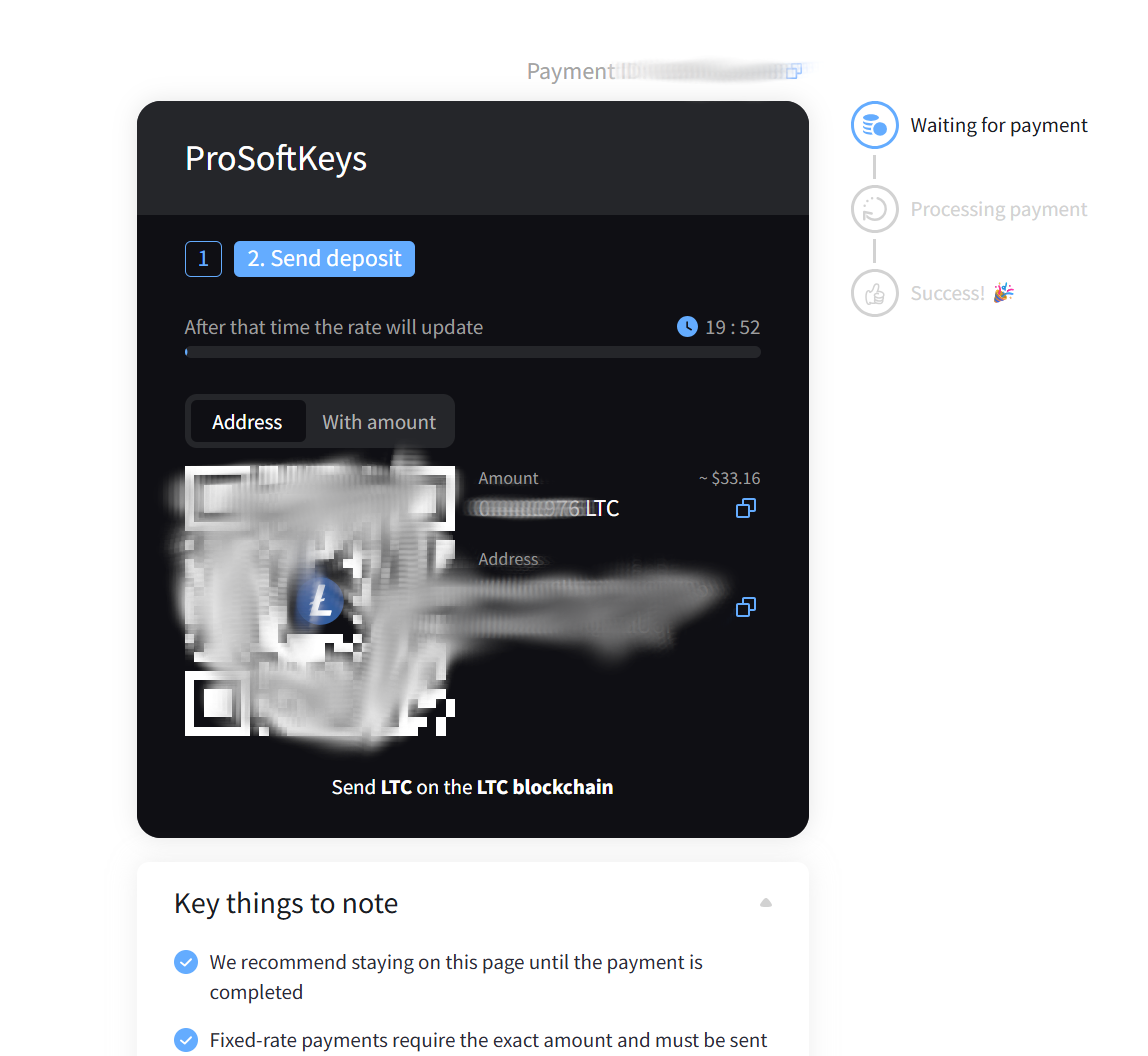
Step 4. Scan or copy, and send the exact amount. A countdown shows how long the rate is held (about 20 minutes) before it re-quotes. Fixed-rate payments require the exact amount on the exact network shown.
Step 5. A live status panel tracks Waiting for payment → Processing → Success. Most assets confirm in under 3 minutes; TRON and Solana often under one. Keep the page open if you can.
💡 Save your Payment ID (shown at the top). It’s the fastest way for support to find your transaction if anything needs checking.
Which Coin Should You Use?
| Coin / network | Typical fee | Speed | Which option |
|---|---|---|---|
| USDC on Polygon (POL) | Under $0.01 | Seconds | ✅ Option 2 — cheapest available |
| POL (Polygon native) | Under $0.01 | Seconds | ✅ Option 2 |
| USDT / USDC on TRON (TRC-20) | Under $1 | Seconds | ✅ Option 2 |
| USDT / USDC on BSC or Solana | Under $1 | Seconds | ✅ Option 2 |
| Litecoin (LTC) | Pennies | ~2 min | ✅ Option 2 |
| TRX, TON, BNB | Under $1 | Seconds | ✅ Option 2 |
| Bitcoin (BTC) | $1–$5 | 10–30 min | ✅ Option 1 |
| USDT on Ethereum (ERC-20) | $2–$7, $20+ when busy | 1–5 min | ⚠️ Option 1 — 5–20% in gas |
Cheapest overall: USDC on Polygon. Fractions of a cent, confirms in seconds. TRON is the close second and more widely held.
Critical rule: send on the exact network shown on the payment screen. Both flows state the network explicitly. USDT sent on BSC to a TRON address is unrecoverable: that’s a blockchain limitation, not a store policy.
Prefer a Different Payment Route?
Not everything fits in an automated checkout. If you’d rather pay by:
- Direct wallet transfer: send straight to our wallet, any major chain
- Binance Pay ID: instant, zero network fee, Binance wallet-to-wallet
- Monero (XMR): fully private settlement
…just email support@prosoftkeys.com with your order details and preferred payment method, and we’ll send payment instructions and deliver your key manually.
Don’t Hold Crypto Yet?
The fastest route is usually an exchange account you may already have. On Binance, Bybit, OKX, Kraken or Coinbase: buy a small amount of USDT or USDC, then withdraw on the TRON (TRC-20) or POL network to the address from Option 2. No new signups, fees under a dollar.
💡 Buy $2–3 more than your order total to cover network fees and rate movement. The remainder stays in your wallet.
FAQ
Why don’t you accept credit cards? We settle directly in crypto, so no processor sits between us and you. That means no chargeback costs baked into our pricing, no regional card blocks, no failed international payments, and no billing data for us to hold about you.
Which option should I pick? Holding Bitcoin, or USDT in a Web3 wallet like Brave or MetaMask → Option 1. Holding anything else, or USDT on TRON/BSC → Option 2.
Do I need to connect a wallet? Only for USDT in Option 1. Bitcoin in Option 1 and everything in Option 2 are plain address-and-QR payments: no connection, no permissions.
Is connecting my wallet safe? The connection is read-and-request only: it lets the page request a payment you then approve in your own wallet. It cannot move funds on its own, and you can disconnect at any time. If you’d rather not connect anything, use Option 2.
How long until I get my key? Automated on confirmation. Most assets: under 3 minutes. Bitcoin: 10–30 minutes depending on congestion.
What if the rate expires while I’m paying? Both screens show a countdown. If it lapses before you send, refresh for a new quote. Sending against an expired quote may leave the order short: recoverable, but it needs a support email.
What if I send the wrong amount? Underpaid orders won’t auto-deliver. Email support@prosoftkeys.com with your order number and transaction hash (or Payment ID) and we’ll settle it. Overpayments are refunded or credited.
What if I send on the wrong network? Usually unrecoverable. Always match the network stated on the payment screen.
Do I need an account? No; guest checkout works. An account just lets you re-download keys later.
🔐 Holding Crypto? Secure It Properly.
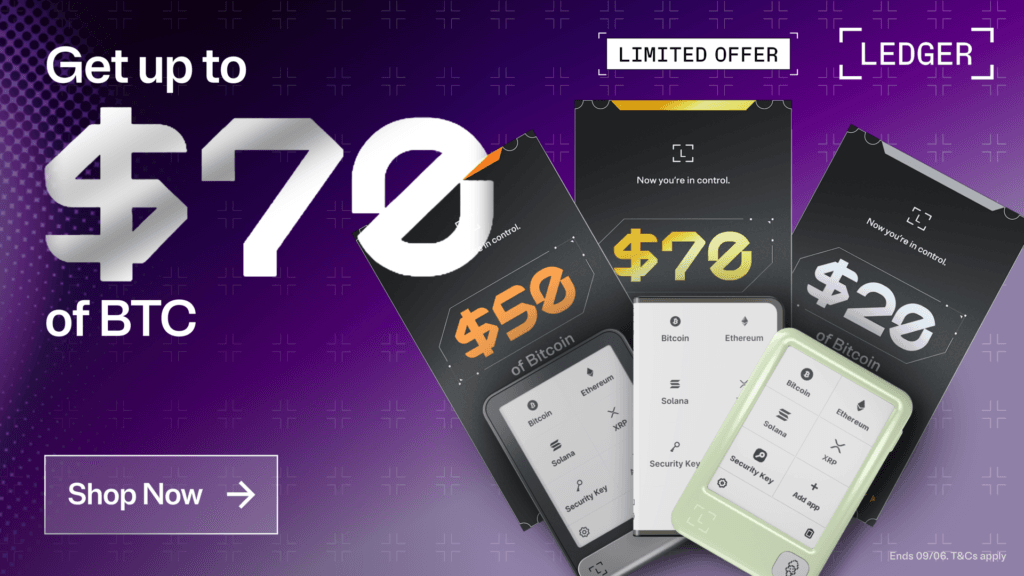
If you're keeping more than pocket change on an exchange, a hardware wallet moves your private keys offline and out of reach of exchange failures and account freezes. Ledger works with every payment method on this page — including one-click USDT via wallet connect.
Back-to-School promo (through Sept 6, while supplies last): Ledger Stax $70 in BTC · Ledger Flex $50 in BTC · Nano Gen5 $20 in BTC · Nano X 20% off.

Affiliate link — we may earn a commission at no extra cost to you.